Tracker features for
pop and push media buyers
Track clicks, landing page views and conversions on ExoClick, PropellerAds, Galaksion, Adsterra and TrafficStars, and run those networks through their APIs from one dashboard. Bot clicks are filtered out of your stats, and your whole team works in it.
Automation for five ad networks, on every plan
API automation for ExoClick, PropellerAds, Galaksion, Adsterra and TrafficStars. Connect your network account once, then create campaigns, block zones and change bids from the tracker. Every change at a network starts with an action of yours: a click, a confirmation or a schedule you set up.
Smart Bid at creation, zone whitelist and blacklist, daily spend import
ExoClick setup guideBids per country, moderation status checked every 15 minutes
Adsterra setup guideAuto-Create
Creates popunder campaigns at the network from the tracker, each already pointing at its tracking link.
- iOS, Android and Desktop templates times up to 50 countries: up to 150 campaigns in one batch, within your plan's campaign limit
- A bid per country, a frequency cap, and OS and OS version targeting
- ExoClick: Smart Bid with a target CPA per country, payouts suggested from your own data, and whitelist zones at creation
- Created without starting and tagged as you choose, so you start each campaign when you are ready
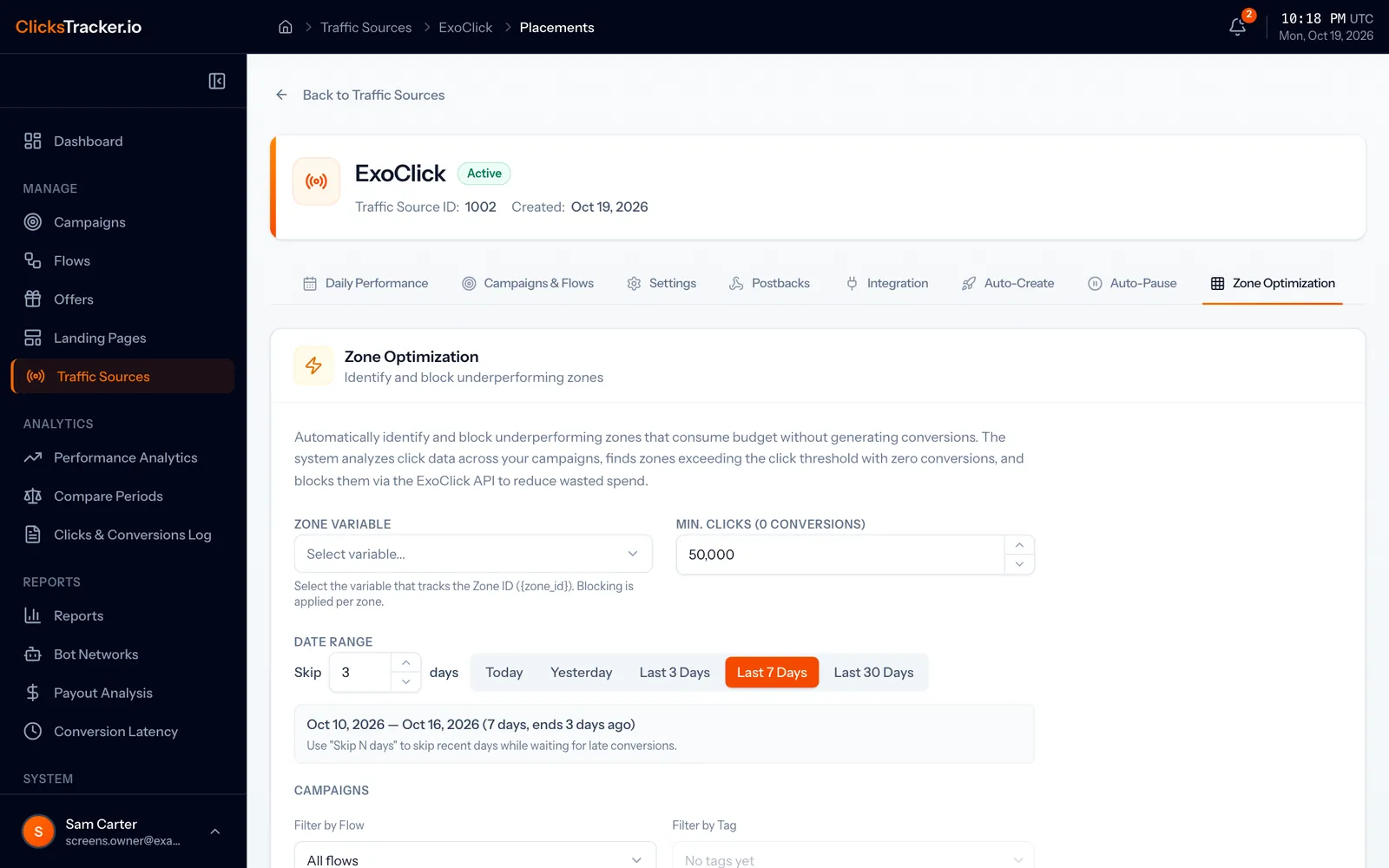
Zone Optimization
Blocks the zones that take clicks without converting, when you run it or on a schedule.
- Blocks zones with at least the clicks you set and no conversions in the date window
- The window can skip the most recent days, so late conversions still count
- Protected zones are never blocked; on an ExoClick or PropellerAds whitelist campaign, losing zones come off the whitelist
- Pick campaigns by hand, or every current and future campaign with given tags
- Skips campaigns the network reports as paused
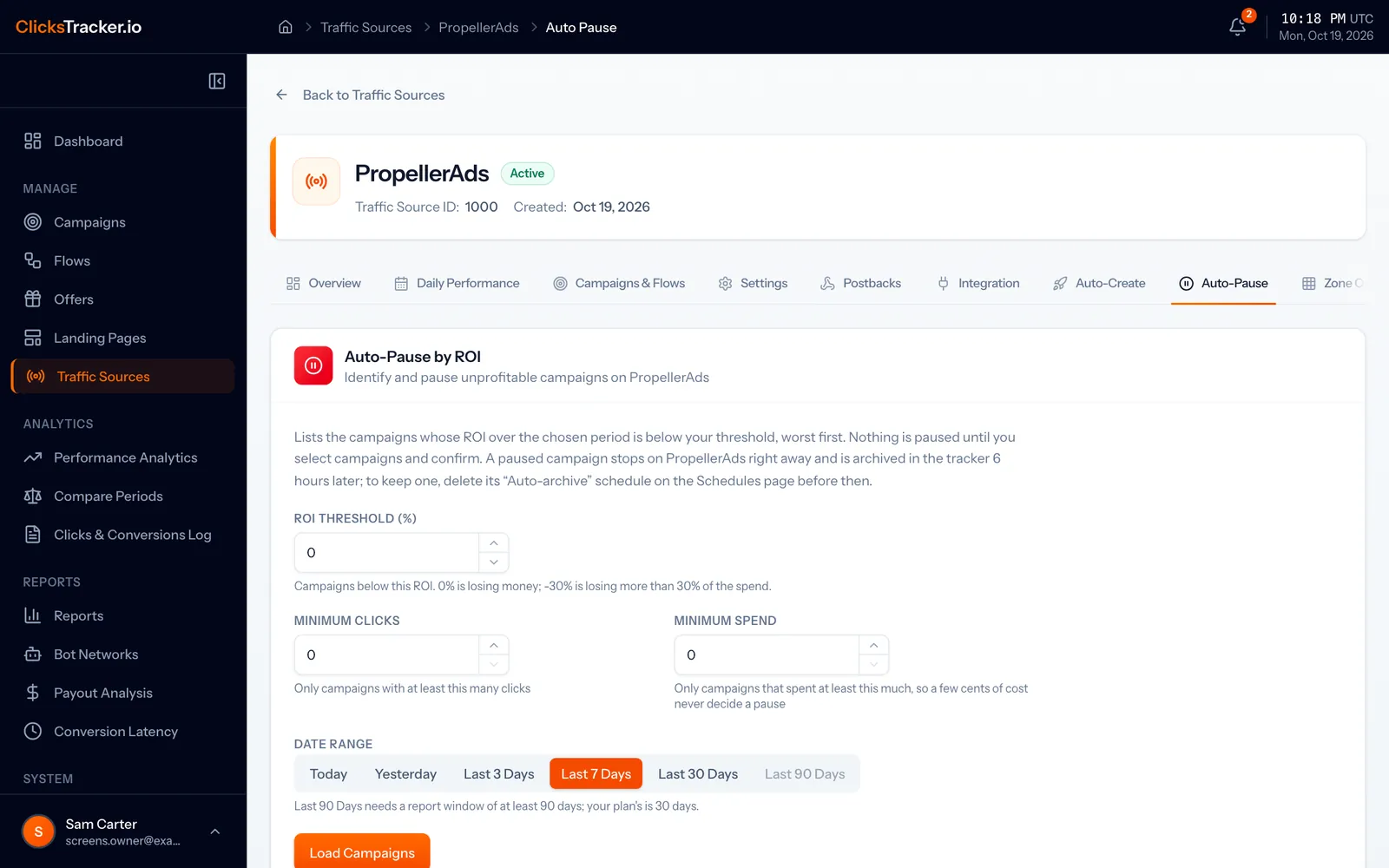
Auto-Pause
Finds the campaigns that lose money. You decide which ones stop.
- Lists the campaigns below your ROI threshold over the period you pick, worst first, optionally only those past a minimum of clicks or spend
- You select and confirm, and the network pauses them
- The tracker archives each one as soon as it is paused
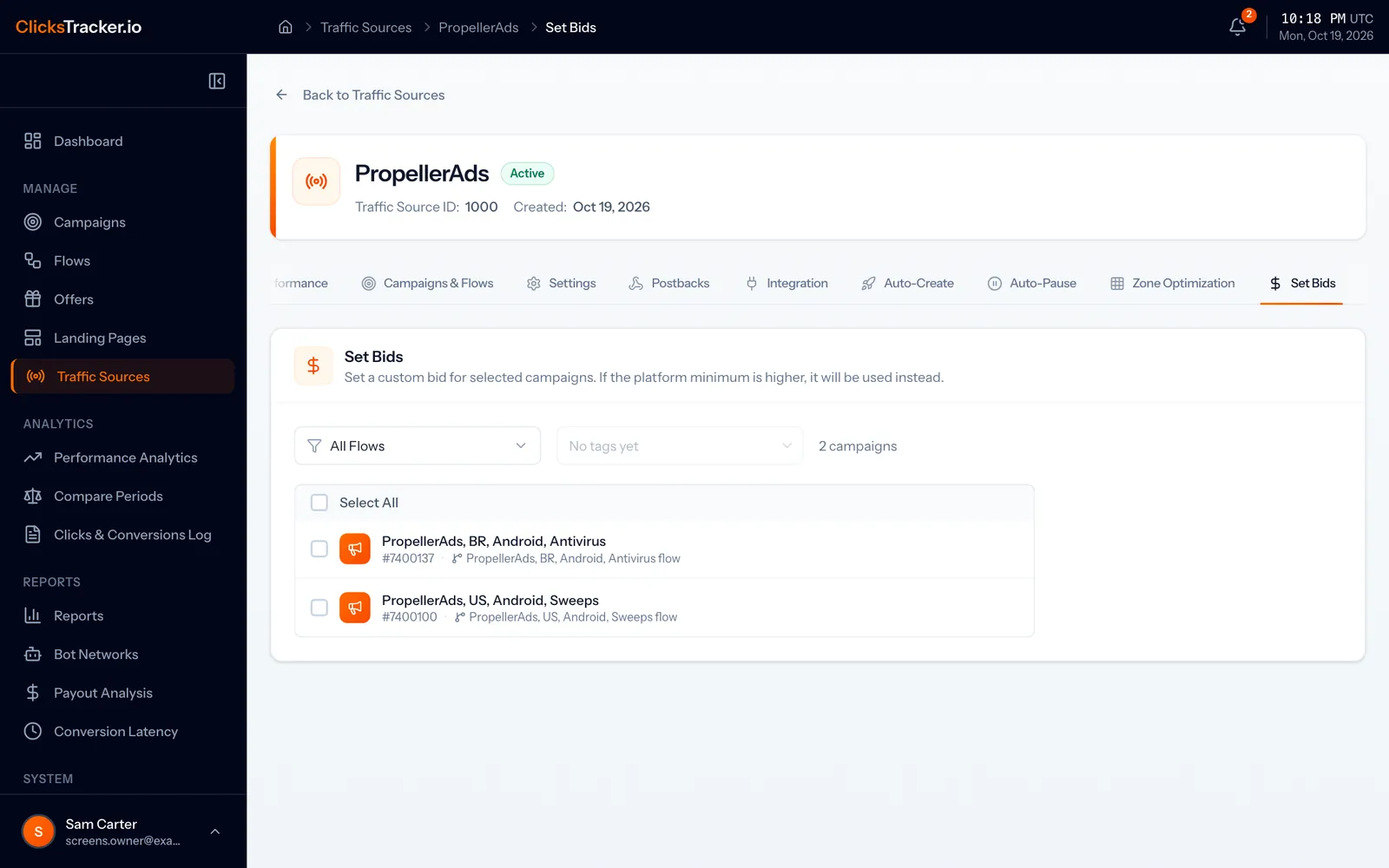
Set Bids
One bid for the campaigns you select, sent once you confirm.
- ExoClick and PropellerAds: your bid, or the network minimum when that is higher
- Adsterra and Galaksion: the network minimum, detected per campaign
- TrafficStars: your bid, with a 0.1 floor
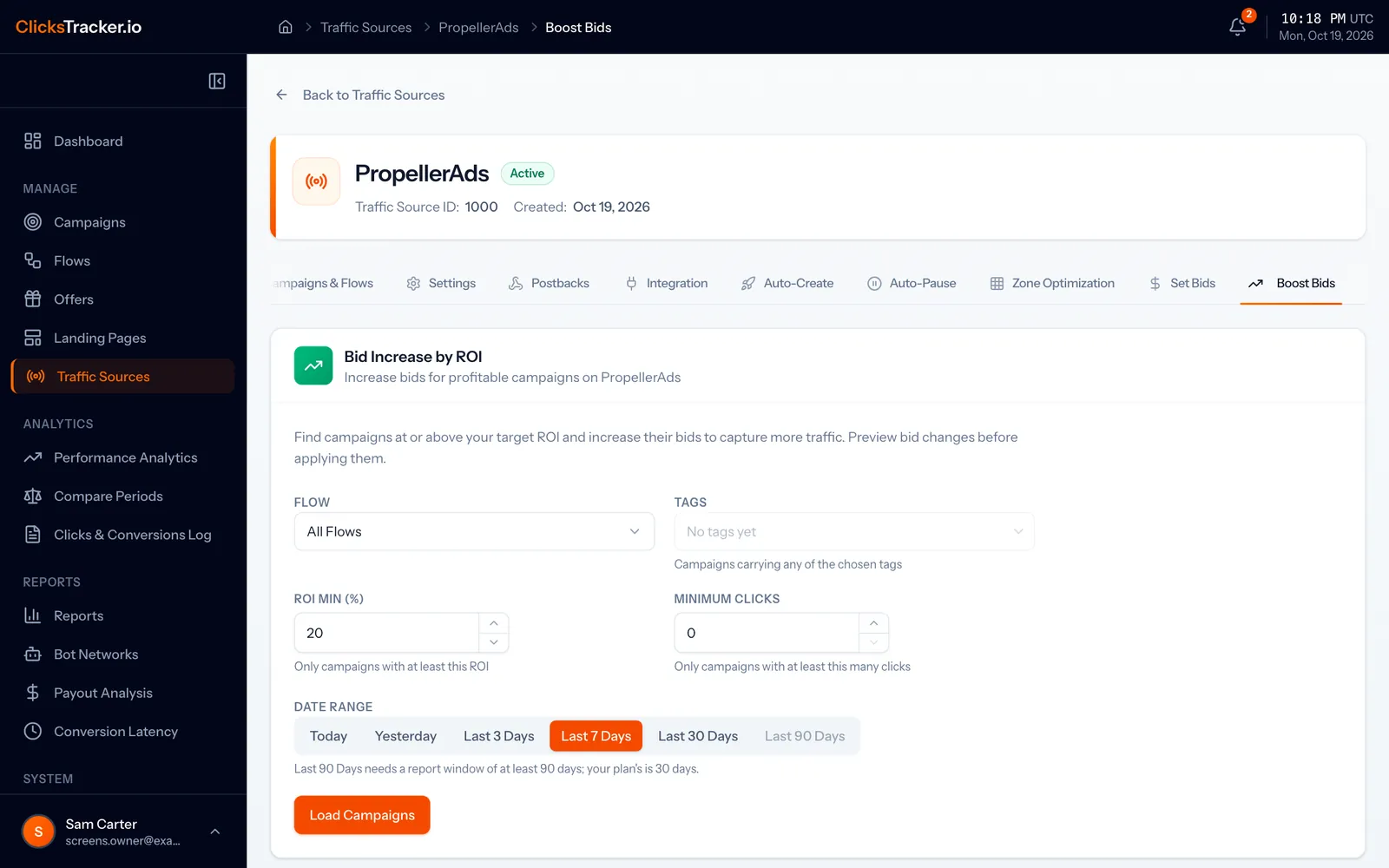
Boost Bids
Raises bids on the campaigns that already pay.
- Up to 100% more on campaigns at or above your target ROI
- Narrow it by minimum clicks or tags
- Every new bid is shown in a preview before you apply it
Campaigns Sync
Keeps the tracker and the network in step, in both directions.
- Lists every campaign whose state differs between the two
- Restore or archive it in the tracker, or pause or start it at the network
- Archiving a campaign in the tracker pauses it at the network within a minute
- Works on the campaigns you created with Auto-Create
Zone Lists and Zone Cards
Every campaign page shows its zones as the network holds them.
- A blocked zones card on every network, a whitelist card on all but PropellerAds
- Add or remove whitelist zones by ID
- Save zones from a report into a zone list, including the profitable zones of a report
ExoClick Spend Import
Daily spend straight from your ExoClick account, for ExoClick campaigns only.
- Reads the daily spend of the last 7 days, up to yesterday
- Spreads each day's spend over that day's clicks, bots left out
- On the other networks, cost comes from the click link (cost={cost}) or a manual update over any date range
Schedules
Zone optimization, campaign archives and pauses at the network can run daily, weekly, monthly or once, in a timezone of your choice.
- Run now at any time for an immediate run
- A schedule that fails 3 times turns itself off and tells you
What differs by network
The tools above work on all five networks, through each network's own API. These are the differences that change what a tool can do.
| Capability | ExoClick | PropellerAds | Galaksion | Adsterra | TrafficStars |
|---|---|---|---|---|---|
| Bids are set | Per campaign | Per country | Per geo | Per country | Per campaign |
| Set Bids applies | Your bid, or the network minimum when that is higher | Your bid, or the network minimum when that is higher | The detected network minimum | The detected network minimum | Your bid, with a 0.1 floor (no minimum detection) |
| Zone whitelist | Yes, and zones can be whitelisted at creation | No, exclusion list only | Yes | Yes (placements) | Yes (spots) |
| After Auto-Create | Paused | Draft | Not started after moderation | Request pending moderation | Paused |
| Spend from the network | Daily spend of the last 7 days, read from your account | No: cost from the click link or a manual update | No: cost from the click link or a manual update | No: cost from the click link or a manual update | No: cost from the click link or a manual update |
| Account access | API token | API token | Account email and password | API token | API token |
Every automation above is included on every plan. See plans and pricing
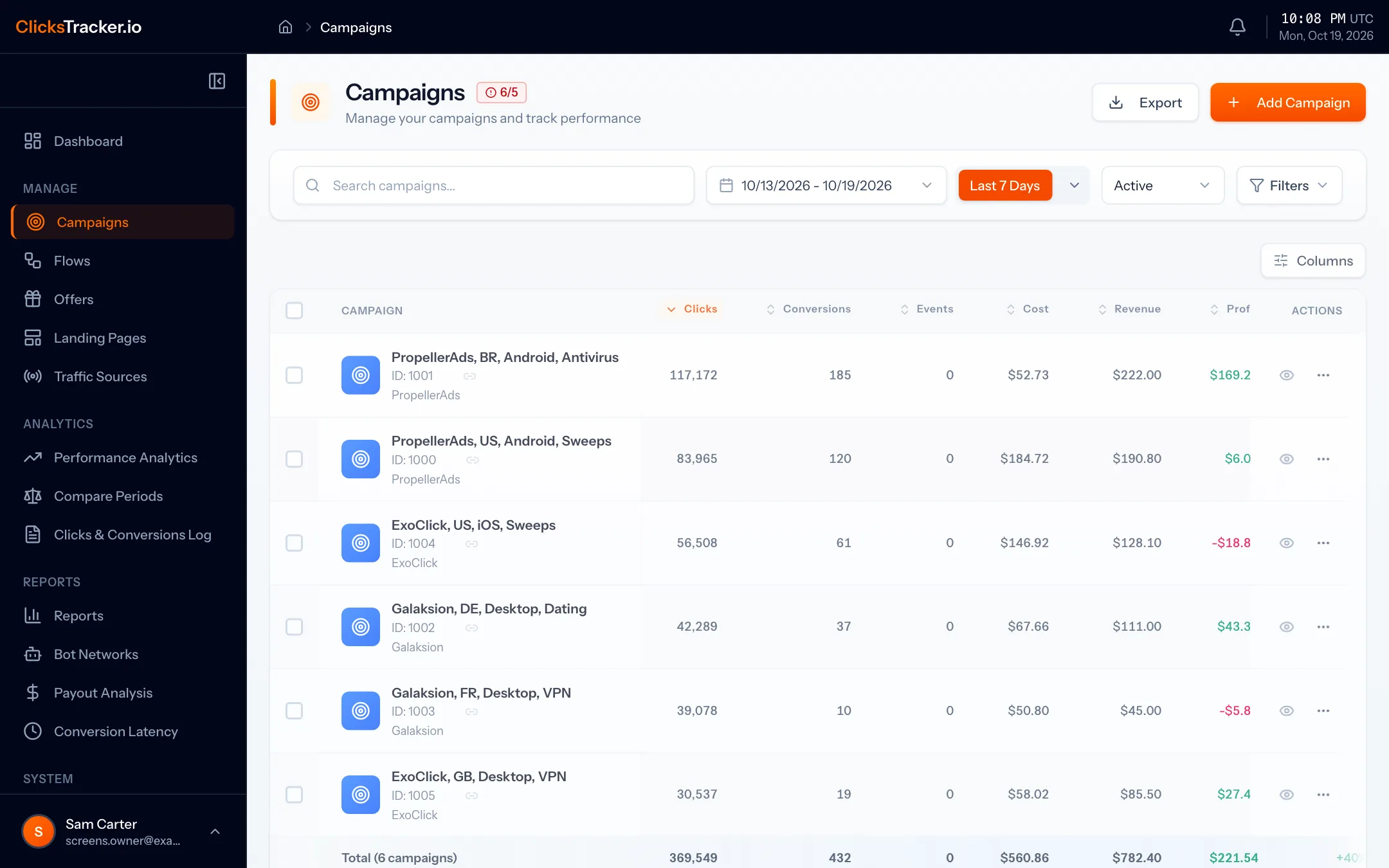
Build, clone and batch edit campaigns
A step by step wizard sets up each campaign: traffic source, flow, cost model and redirect type. Clone the ones that work, change many at once, and archive the rest to keep your list clean.
- Step by step wizard that walks you through every setting
- Clone a campaign with all its settings
- Batch edit up to 100 campaigns at once: traffic source, cost model and value, flow, redirect type and send on events
- Archive and restore campaigns; pausing and starting happen at the network, through Campaigns Sync or Auto-Pause
- Clicks, conversions, events, cost, revenue, profit, ROI, CPM, EPM and CVR on every row, sortable, with columns you can hide
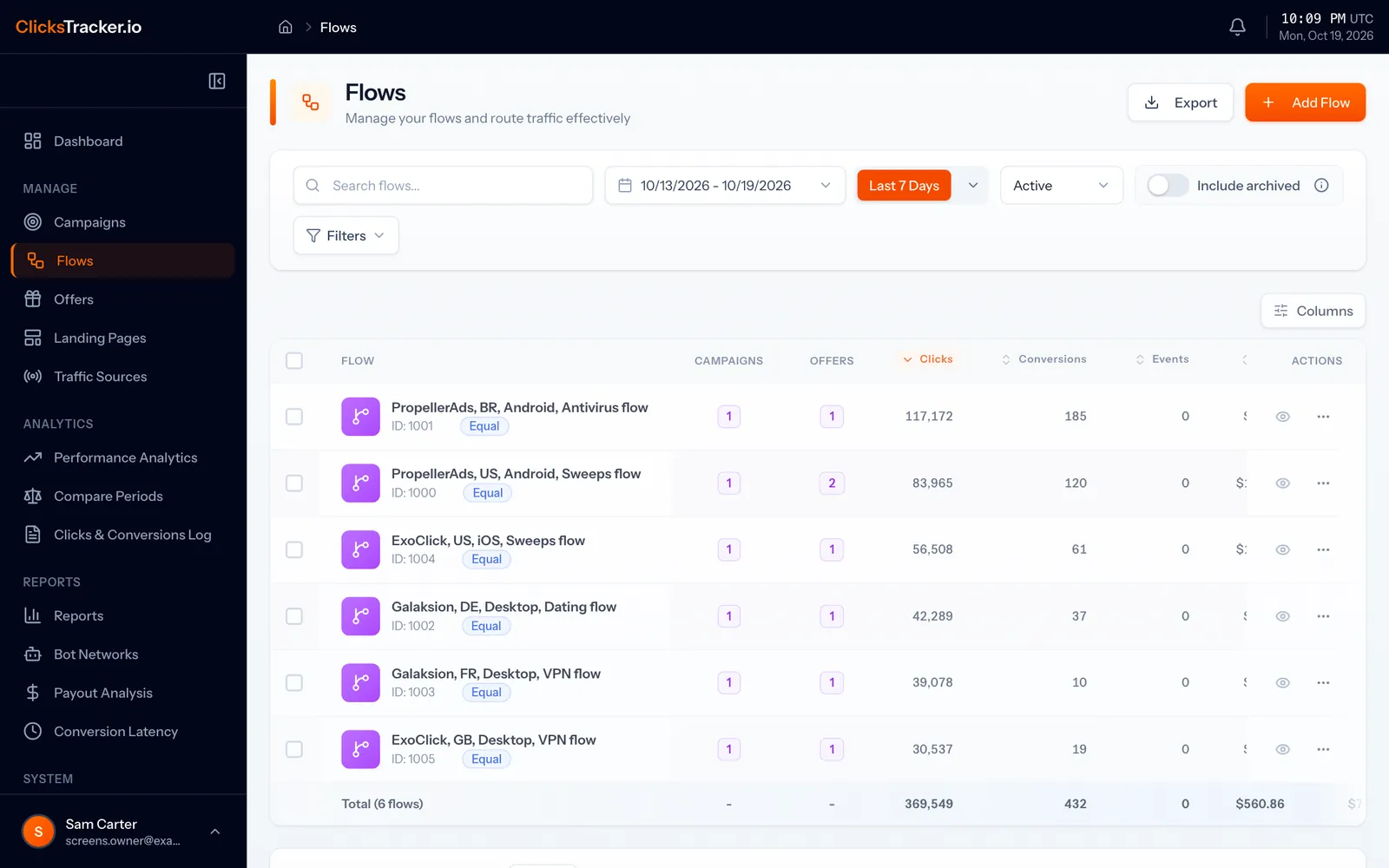
Know which setup wins before you scale
Split-test offers with weighted flows and compare them as the stats come in. Each click draws an offer at random by its weight, so the shares converge on your percentages as volume grows.
- Weight each offer from 0 to 100%, and its share converges on that weight over volume
- Equal weights, or your own weight for each offer, with any number of offers in a flow
- Offer URL macros pass the click ID, cost, country, city, ISP, language, OS, browser, device, your variables v1 to v10 and more
- Up to 10 custom variables per traffic source, such as zone, creative or site
- Track payout and revenue per offer for accurate ROI
Routing rules send each click to the right flow
Give a campaign up to 20 rules with up to 10 conditions each. The first rule that matches sends the click to its flow, and a click no rule matches goes to the campaign's default flow. If a matched rule points at a flow whose offers cannot be loaded, the click goes to the default flow instead of nowhere.
- Country, device type, OS, browser and connection type, each as "is one of" or "is not one of"
- Hour of day and day of week in UTC, with hour windows that can wrap past midnight
- First match wins, so the narrowest rule goes on top
- Rules apply to clicks on the campaign URL
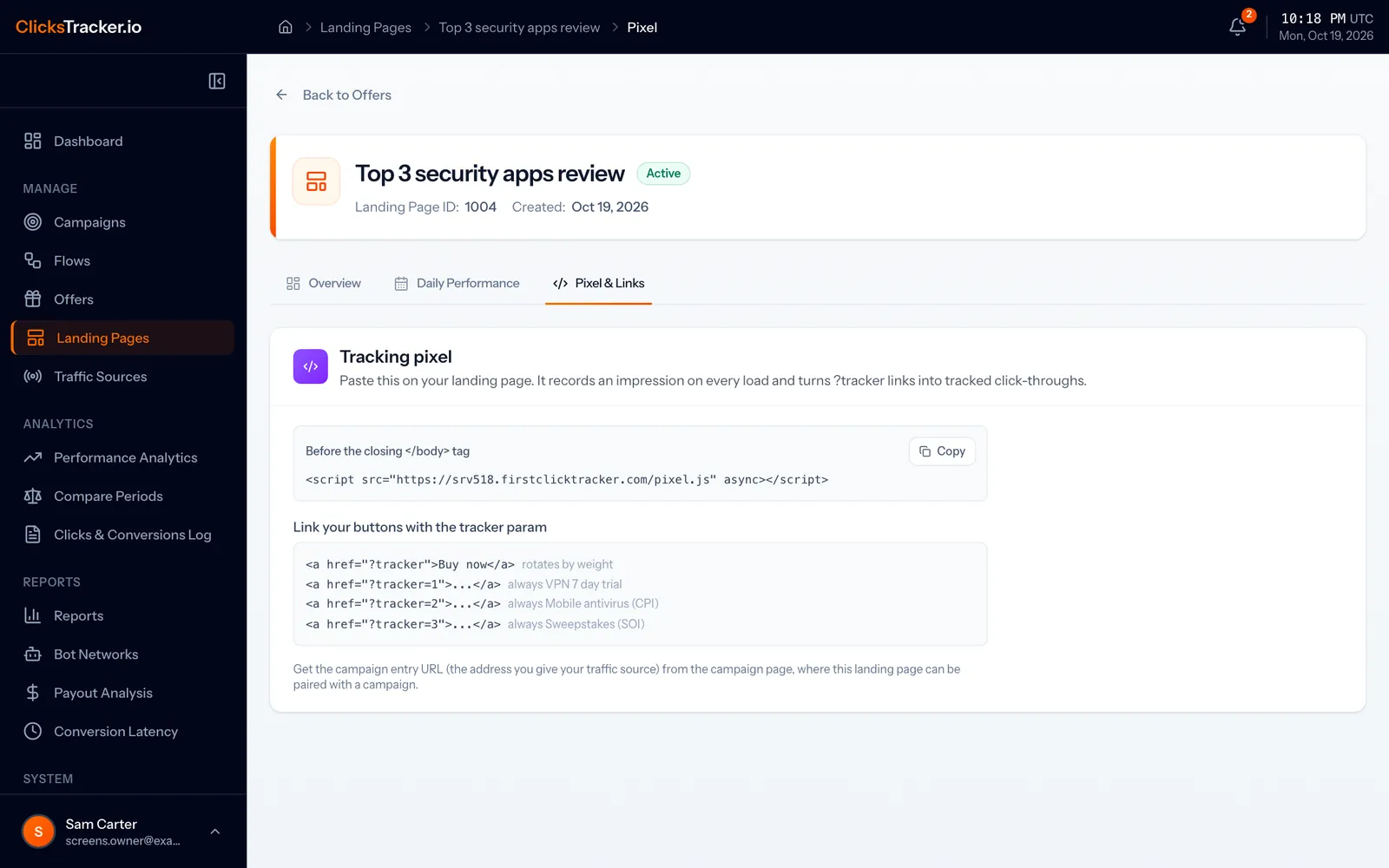
Landing page tracking without a redirect hop
Visitors go straight from the traffic source to your own page. One script tag, pixel.js, loaded from your tracking domain, counts each view and turns your ?tracker links into tracked clicks.
- Paste the snippet before the closing body tag: it reports the view to /imp and rewrites every ?tracker link to /click/lp
- Up to 20 offers per landing page: a bare ?tracker link rotates by weight, ?tracker=2 always sends to the second offer
- Impressions, clicks and CTR, with the cost charged on the impression, the visit you paid for
- A reload by the same visitor within 30 seconds normally counts once, so a reload storm is not billed
- The traffic source's click ID and your variables travel from the page to the offer
Setting up your first campaign and landing page? Read the getting started guide
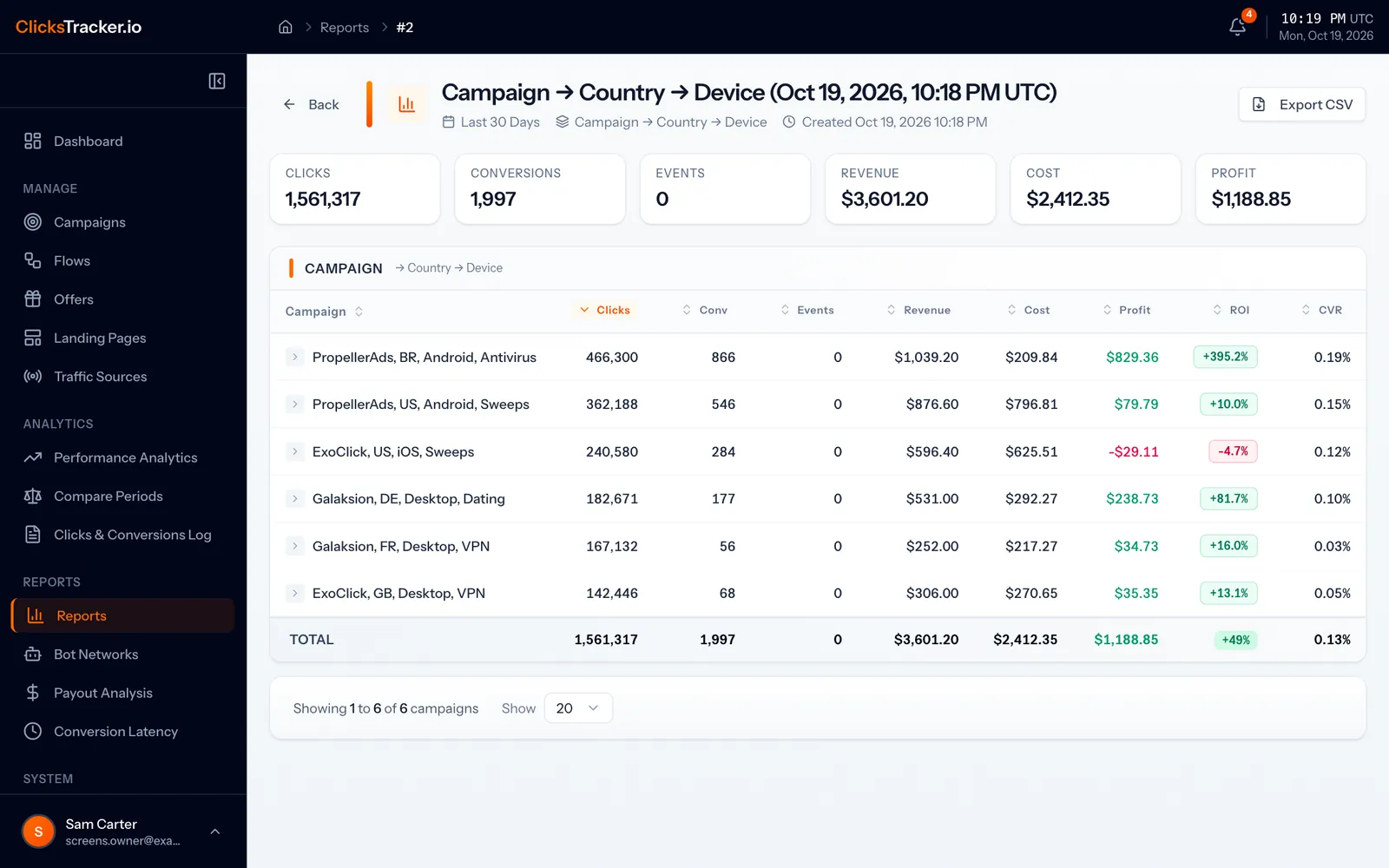
See exactly where every dollar goes
Profit and ROI follow your clicks within about 30 seconds. Cost comes from the cost model you set, or from the bid the traffic source passes in the click link, and you can correct it for any date range when the network's invoice says otherwise.
- CPC, CPM and CPA cost models, or a cost per click passed in the link with cost={cost}
- Enter what you spent over any date range, and it is spread over the clicks of that range
- ExoClick campaigns can import their daily spend of the last 7 days from your account
- Profit, ROI, EPC, CPC, CPA, CVR and EPM in the Report Builder
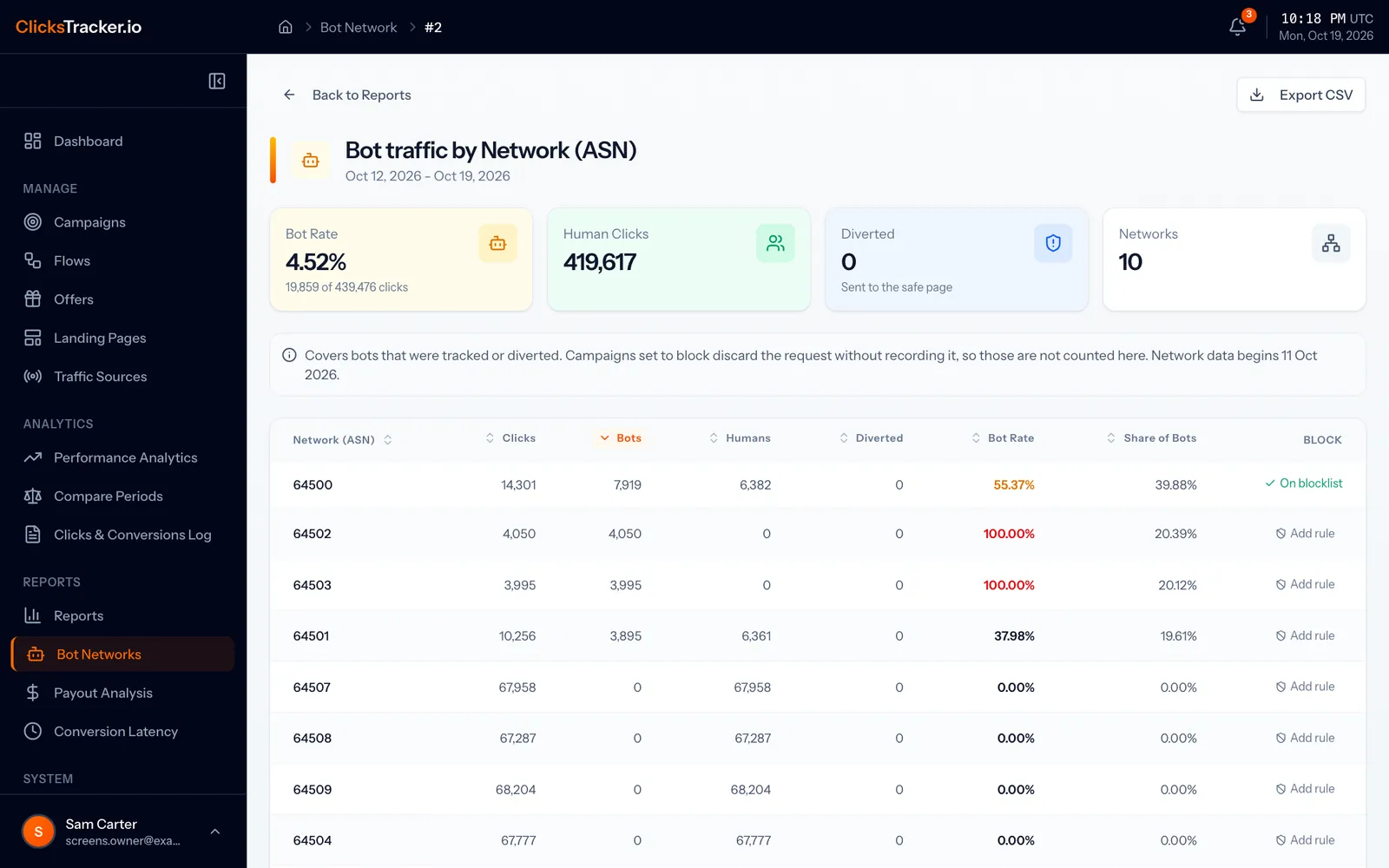
Bot clicks filtered out of your stats
Every click is checked against about 150 user agent patterns: search and social crawlers, HTTP libraries, headless browsers, scanners, AI crawlers and monitors, plus empty, very short and non browser user agents. Bot clicks stay out of your stats, so your clicks, conversion rates and ROI follow real visitors.
- A bot action per campaign, with a workspace default: track it, divert it to a neutral page instead of your offer, or block it
- Blocklist rules by IP address, CIDR range (IPv4 and IPv6) or ASN, each set to divert or block, added one by one or in bulk
- A bot network report shows the bot rate by ASN, ISP, organization or connection type, with a one click Block on ASN rows
- Bot clicks add no cost to your stats: a cost update spreads the spend over the human clicks
What counts toward your plan, and what it costs: see pricing
Reports that show what pays
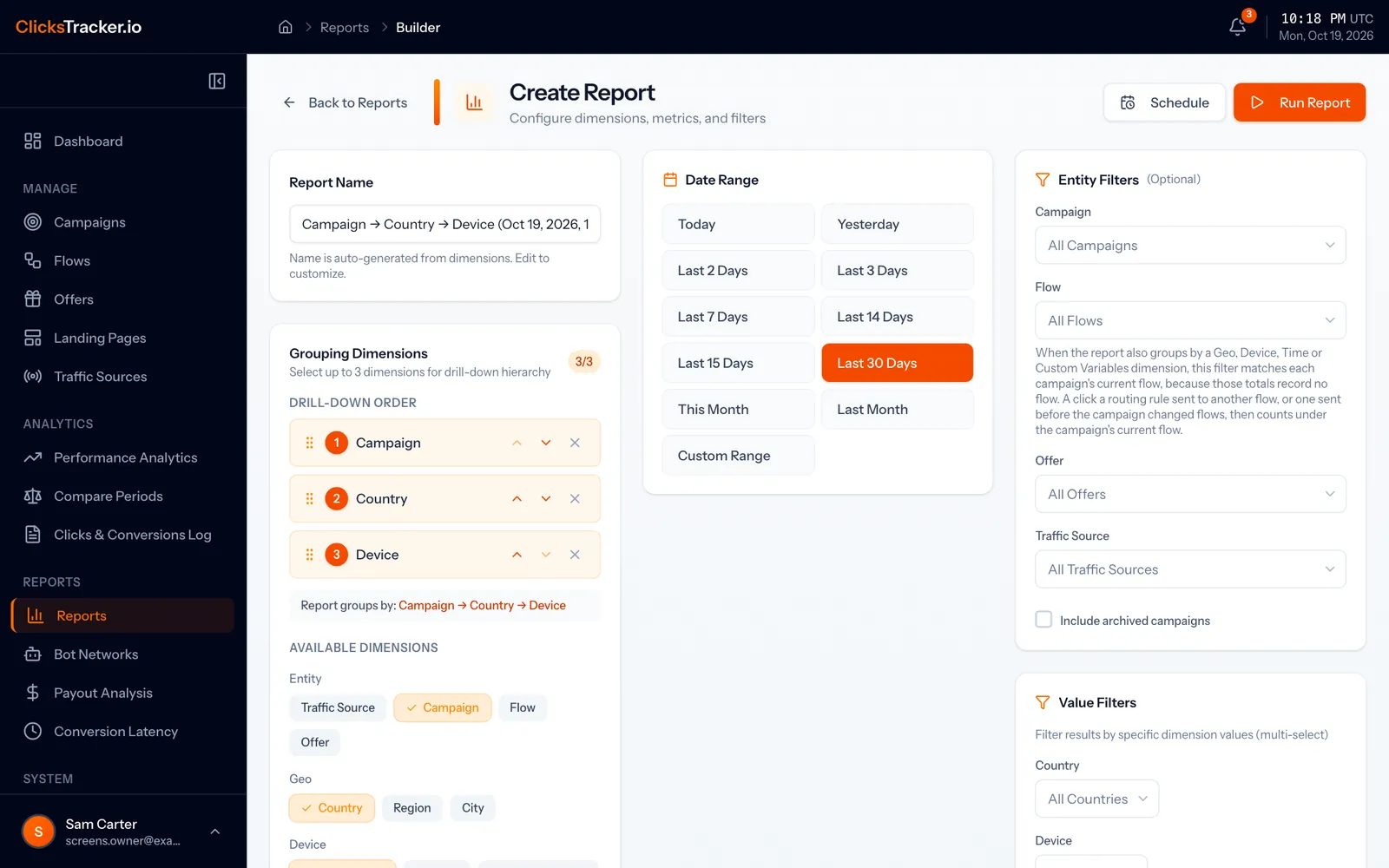
Stats arrive within about 30 seconds of a click. Break them down by campaign, zone, geo, device and your own variables, then save, schedule or export what you need.
Live Dashboard
Clicks, conversions, revenue, cost and profit for the period you pick, in near real time. The dashboard refreshes itself while it is open.
Hourly and Daily Stats
Spot trends by the hour or by the day with interactive charts. Filter by traffic source, flow or date range to see what drives your results.
Report Builder
22 dimensions, among them traffic source, campaign, flow, offer, country, region, city, device type, browser, OS, brand, date and your 10 variables, nested up to 3 levels. 15 metrics: clicks, conversions, events, impressions, CTR, cost, revenue, profit, CVR, ROI, EPC, CPC, CPA, CPM and EPM.
Campaign Breakdowns
Each campaign page splits its traffic by browser, OS, device, device type, brand, country, city, ISP, referrer, language and variables.
Clicks and Conversions Log
Inspect every click, impression and conversion on its own. Filter by campaign, flow, offer or source to debug issues or verify payouts.
Geo Analytics
Every click carries its country, region, city, ISP, organization, ASN and connection type. Find the geos that pay, cut the rest.
Device Detection
Device type, brand, OS and OS version, browser and language on every click, so you can target the devices that convert.
Conversion Latency
See how long clicks take to convert, so you know how many recent days zone optimization should skip and when a new campaign has had enough time.
Payout Analysis
See average, minimum and maximum payouts per campaign, offer or geo, and find where the payouts that matter come from.
Period Comparison
Compare 2 to 4 periods side by side, such as today against yesterday or this week against last week, and export the comparison to CSV.
Saved and Scheduled Reports
Every Report Builder run is saved, so you can open it again or export it. Turn the same setup into a schedule, and use Run now when you want a fresh copy.
CSV Exports
Export lists, logs and reports to CSV. Large exports run in the background, and a notification tells you when the file is ready.
Reports and routines on a schedule
Schedule a report, an export, a zone optimization run, a campaign archive or a pause at the traffic source. Results land in the app, and an email copy is yours to switch on per notification type.
- Daily, weekly, monthly or one time, each schedule in its own timezone
- Run now whenever you want a fresh result
- CSV exports run in the background with progress tracking
- A schedule that fails 3 times turns itself off and notifies you, so you know when something breaks
Postbacks and affiliate networks
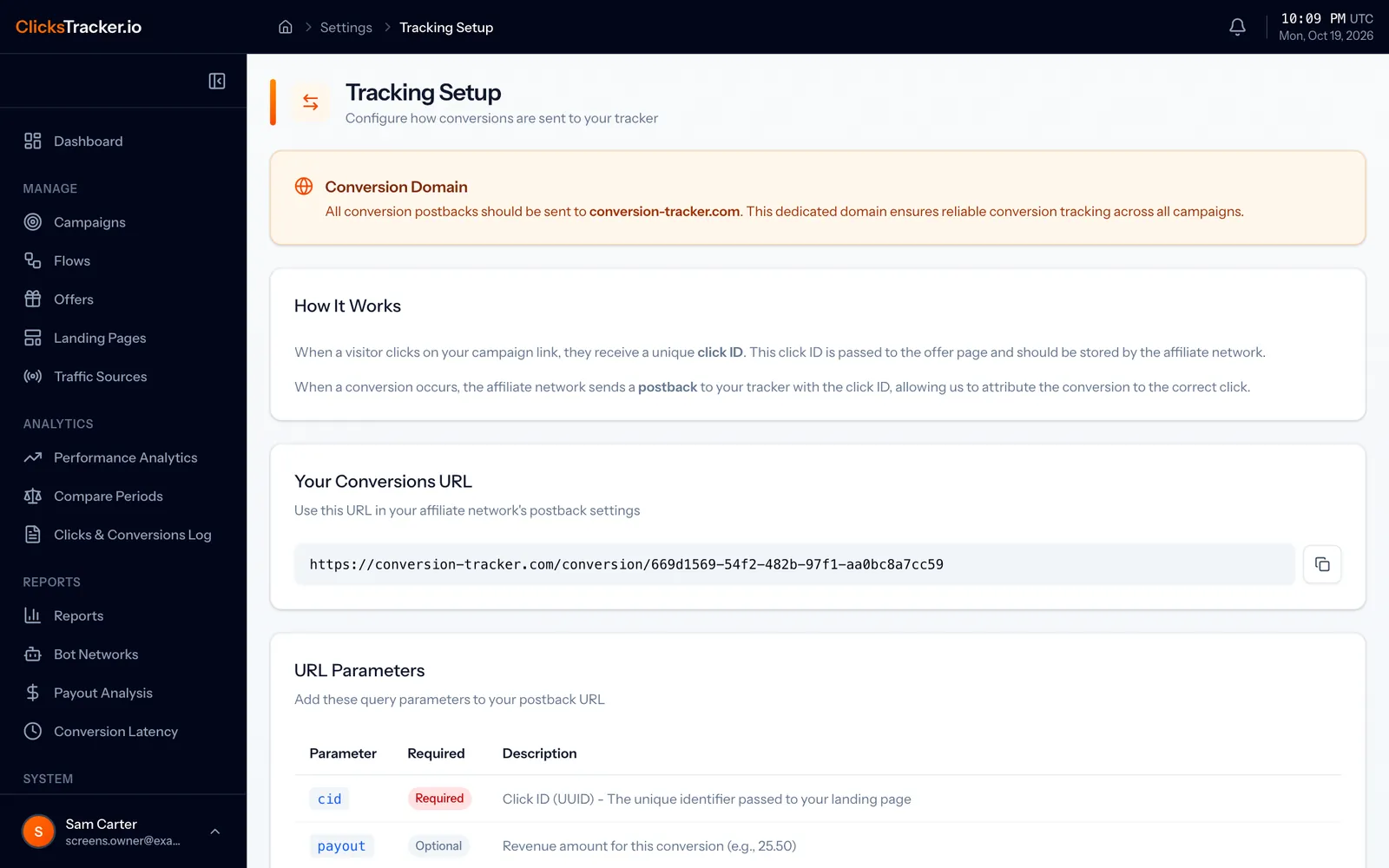
Affiliate networks send conversions to one endpoint per workspace. The tracker ties each one to its click and sends your postbacks on to the traffic source.
Every conversion tied to its click
Your network calls /conversion/{workspace}?cid=&payout=&tid= by GET or POST, with the tracker's
click ID in cid, and the HTTP answer says what happened to it.
- 200 means accepted and queued, 202 means the click has not arrived yet, 409 means a duplicate
- A conversion that arrives before its click waits in a pending queue and is retried, less often as time passes, for up to 24 hours
- A new tid on a click that already converted adds a revenue event, for upsells and rebills; the same tid twice is refused
- Unconvert up to 500 pasted click IDs at once, with a reason; who did it is stored
Postbacks to Traffic Sources
Up to 3 postbacks per campaign and 3 per traffic source, fired server to server when a conversion is stored. Send on events, set per campaign, decides whether the traffic source's postbacks also fire for later revenue events.
Postback Tokens
Fill the postback URL with the traffic source's own click ID as {external_id}, the payout, transaction ID, event count, country, city, ISP, device and campaign, and your variables {v0} to {v9}.
Retries and Delivery Log
A failed delivery is tried 3 times, 60 seconds apart, then by an hourly retry run while tries remain. Retry any failed one by hand, and read every response code in the delivery log.
Affiliate Network Templates
Ready made setups for CrakRevenue, LosPollos, ClickDealer, Zeydoo, Dr.Cash, AdCombo, LemonAD, Everad, MyLead and Mobipium: copy the offer link parameter and the postback URL with the network's macros mapped.
Trip.com and Viator Imports
Upload the network's report and the conversions are matched to their clicks. Trip.com imports filter by status and set a commission per product type.
AliExpress Token Pools
Five token lists. An offer URL with an {aliexpress_01} to {aliexpress_05} placeholder gives each click a token from that list, and a token that produced a sale is retired.
Step by step for your network: the postback setup guide
Branded tracking domains, automatic SSL
Generate a vanity tracking subdomain in one click, and we set up its DNS and its SSL certificate. A subdomain you own works too, such as track.yourdomain.com, connected with one CNAME record.
- Custom domains: we check the CNAME every 15 minutes or when you click Check now, and load the SSL certificate once DNS points at us
- Custom domains and vanity subdomains share your plan's domain limit, on every plan
- A pool of redirect domains, generated 5 at a time, gives the private redirect types a second hop through another of your domains
- Health checks on every domain: the owner is alerted when a custom domain stops answering, and we watch the vanity ones
- An SSL certificate set up for every domain, generated or your own
Choose your redirect type
Three redirect types per campaign, to trade a little speed for keeping the traffic source out of the offer's referrer.
Basic Redirect
A direct 302 to the offer, the fastest type with no hop in between. It does not hide the referrer, so use it where that does not matter.
Standard Redirect
A 302 to another of your domains, then a meta refresh to the offer, so the offer does not see where the click came from.
Stealth Redirect
Two meta refresh pages with a hop through another of your domains, for the strictest referrer hiding of the three.
One workspace for your whole team
Bring your whole media buying team into one workspace, each person with the access their role needs.
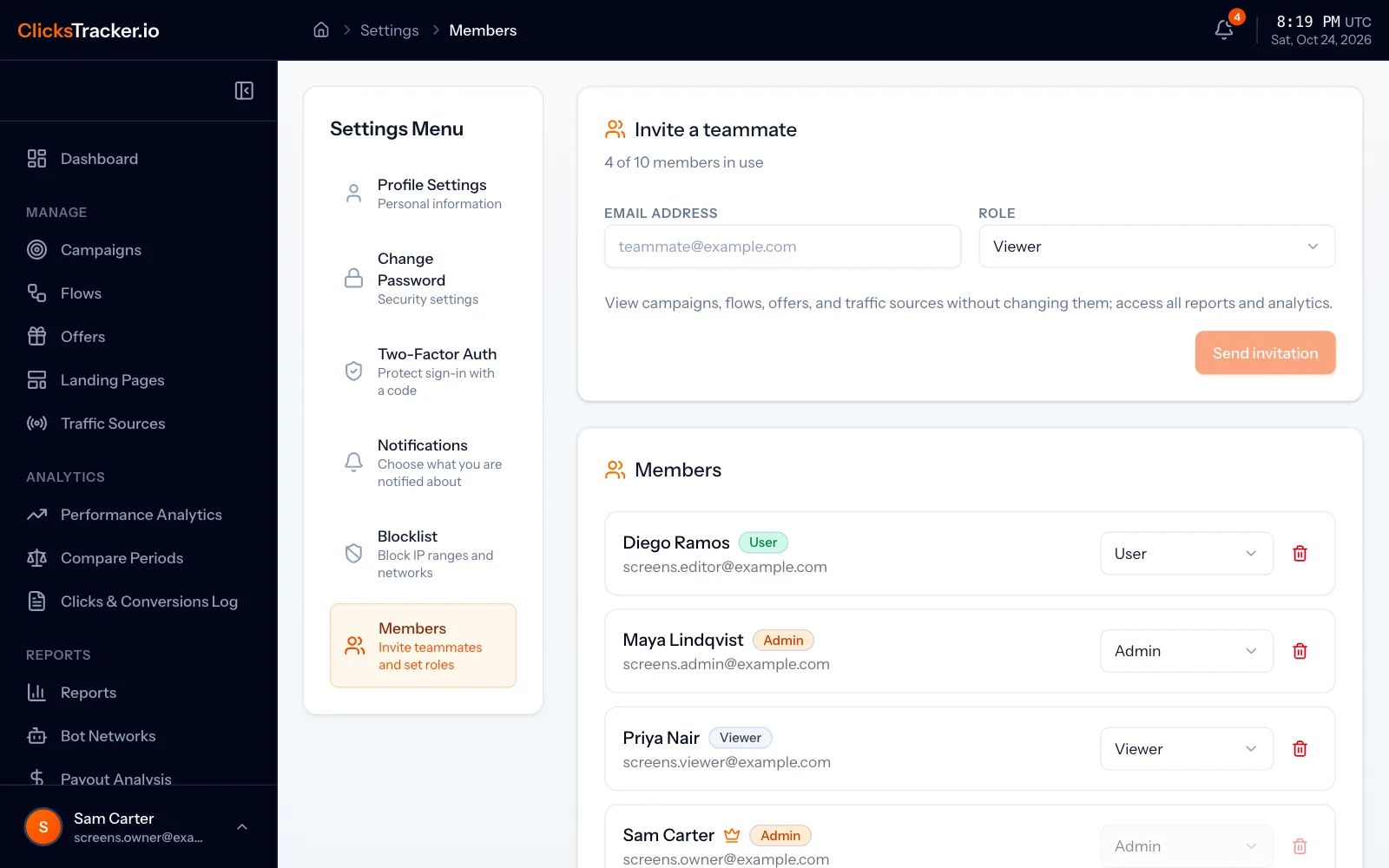
Three Roles, No Seat Pricing
Admin (everything, members and billing included), user (everything but members and billing) and viewer (read only). The Advanced team add-on brings them to any plan, for up to 10 members at one flat price; without it every member is an admin. No plan charges per seat.
Two-Factor Security
Protect each account with app based two-factor codes and one time recovery codes, switched on under Settings, Security.
Encrypted Network Credentials
The API tokens and passwords of your ad network accounts are encrypted at rest.
Tags
Tag campaigns, or let Auto-Create tag them. Boost Bids can work on a tag, and zone optimization can cover every current and future campaign with it.
Notifications
Finished reports, exports, imports and cost updates, domain problems, usage, billing and disabled schedules appear in the app as they happen. Email is opt in per notification type.
Workspace Timezone
Pick the timezone your report days start in. Stats are stored in UTC, and a saved report keeps the days it was run with.
How roles and invitations work: ClicksTracker for media buying teams
The platform behind your tracking links
What runs behind your tracking links, and how your usage is counted.
Dedicated Databases
Your data lives in its own database, not in tables shared with other customers.
Fresh Stats
Clicks reach your reports in batches as they arrive, so a new click shows up in your stats within about 30 seconds.
Redirects That Keep Running
Your tracking links keep redirecting when a payment fails, and a double fired click with the same traffic source click ID within 1.5 seconds counts once.
Billing & Usage
An event is one click or landing page impression; conversions and postbacks are not counted. You get usage notices at 80, 90, 100 and 110%, and overage is billed while your tracking keeps running.
Ready to take control of your campaigns?
Start tracking with a database of your own, API automation for five ad networks and bot filtering on every click.