Affiliate Tracker
for Media Buying Teams
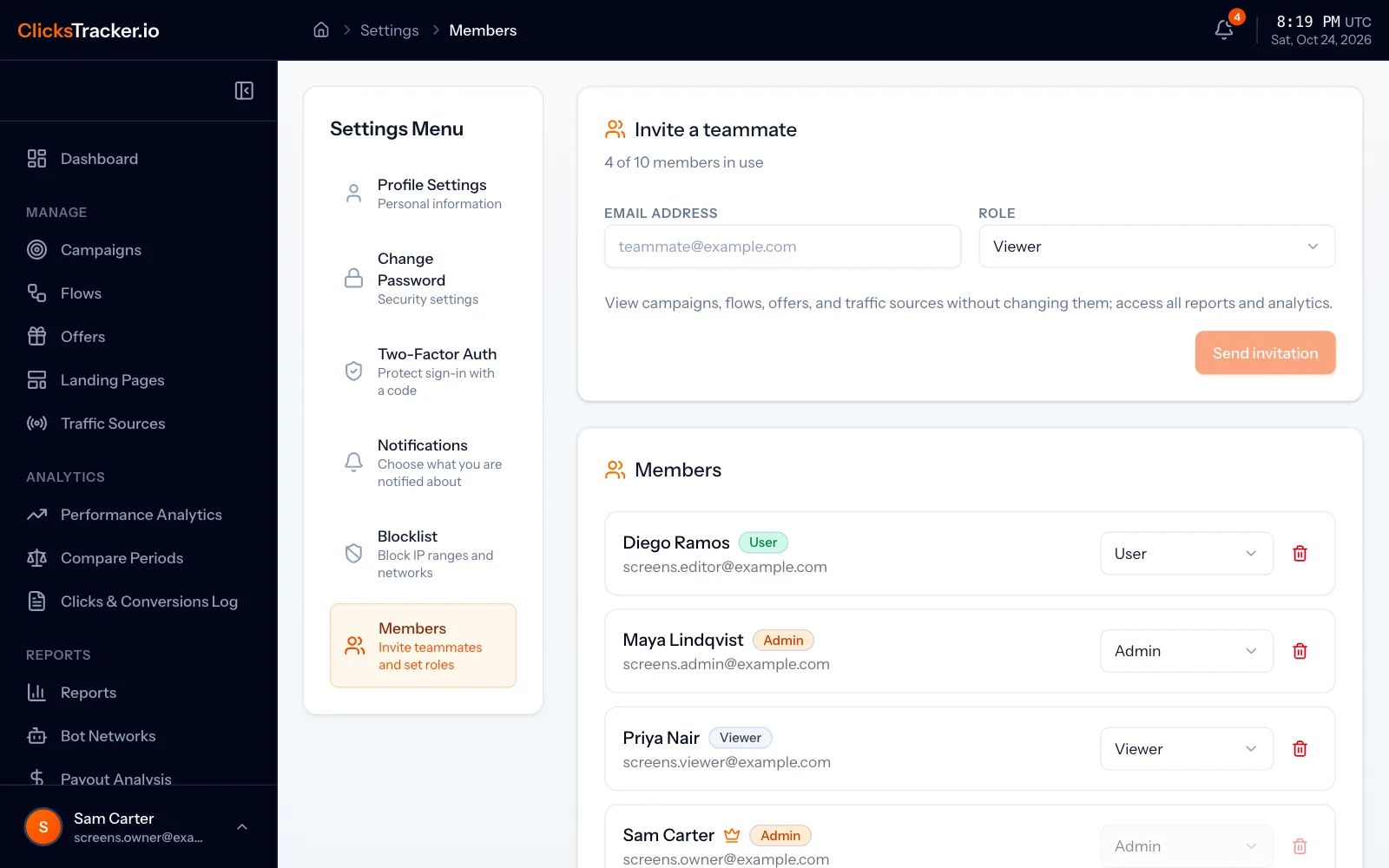
Invite your team into one workspace and give each person a role: admin, user or viewer, with the Advanced team add-on on any plan. No per seat pricing, and every workspace has its own database.
Three roles, one workspace
Every member holds one role, and the role alone decides what they can change. Admins pick it when they invite someone and can change it later. The user and viewer roles come with the Advanced team add-on; without it every member is an admin.
Everything
Admin
Builds and deletes campaigns, flows, offers and traffic sources, changes the workspace settings, invites, changes and removes members, and manages billing and the billing notices. Whoever creates the workspace stays an admin and cannot be removed.
Campaigns and settings
User
Everything an admin does except members and billing: creates, edits and deletes campaigns, flows, offers and traffic sources, saves ad network credentials, runs Auto-Create, zone optimization and bid changes, and changes the workspace settings and the notification preferences, except the billing notices.
Read only
Viewer
Reads the dashboard, every report and every campaign, flow, offer and traffic source, and changes nothing. Viewers can never edit a campaign, so a client or a new hire can follow the numbers without the controls.
Built for people buying on the same accounts
What a team gets beyond the roles. An invite needs room on the plan (Starter and Pro include one member, Team and Scale two) or the Advanced team add-on, and the rest is on every plan, like every tracking feature.
Roles and Invitations
Invite teammates by email and pick their role. Someone who already has a ClicksTracker login joins with it, and a new person gets a link to set their own password. Change or revoke access at any time. No plan charges per seat.
One timezone for every report
The workspace timezone decides where each report day starts, so a buyer in Berlin and one in Manila read the same daily numbers. Each schedule can still run in a timezone of its own.
Tags that split the work
Tag campaigns by buyer, geo or offer. A zone optimization rule can follow every current and future campaign with a tag, and Boost Bids can filter by tag, so each buyer can run automation on their own campaigns.
One view of a shared ad network account
When several people buy on one network account, the Campaigns Sync tab lists each campaign made with Auto-Create, its state in the tracker beside its state at the network. Pause or start it at the network, or archive or restore it in the tracker, so both sides agree.
Two factor authentication per member
Each member can turn on app based two factor authentication with recovery codes. It is optional: the dashboard suggests it while the workspace stores ad network credentials, and an admin cannot make it mandatory for others.
One set of notification preferences
Notices about finished reports and exports, billing, domains and the system arrive in the app and by email as they happen, and each can be switched off per type. The workspace keeps one set of preferences, and only admins change the billing notices.
Everything else the team works from
The data, reports, bulk tools and domains of the workspace are the same for every member, within what their role allows.
A database of its own
The workspace keeps its campaigns, clicks, conversions and stats in a database of its own, apart from other customers' data. Logins, domains and billing sit in one central database.
Scheduled Reports
Set up daily, weekly, or monthly reports that run automatically. Export to CSV without manual work. Results land in the app, and Run now starts any schedule at once.
Bulk Operations
Batch edit up to 100 campaigns at once (traffic source, cost model and value, flow, redirect type, send on events) or up to 100 offers, and archive campaigns, flows, offers and traffic sources in bulk.
Tracking Domains
Generate branded tracking subdomains or connect a subdomain you own with one CNAME record, both with automatic SSL, within the plan's domain limit. Admins and users manage them, and every campaign of the workspace can use them.
Reversals with a name on them
Manual Unconvert reverses the conversions of up to 500 pasted click ids at once and asks for a reason, and each reversal is stored with the member who made it. Viewers cannot run it.
Up and running in three steps
Three steps to get your entire team tracking campaigns in one isolated workspace with shared visibility.
Create your account
Registration is by invitation during the private launch. Request access, then pick a plan, verify your email and pay at Checkout.
Invite your team
Admins invite teammates by email and pick a role for each. Everyone joins the same workspace and sees the same campaigns, offers, flows and stats, with the access their role allows.
Track and scale
Users build and adjust campaigns, flows and offers while viewers read the same numbers, so the whole team works from one set of data and scales what works.
Questions teams ask
Do I pay per team member?
No. No plan charges per seat. Starter and Pro include one member, Team and Scale two, every one of them an admin. The Advanced team add-on gives any paid plan up to 10 members with the admin, user and viewer roles for a flat $49 a month.
Can a team have a second workspace?
No. An invited teammate joins the workspace of the person who invited them, there is no workspace switcher, and every campaign, report and setting of the team lives in that one workspace.
Who can see and change billing?
Only admins. A user does everything an admin does except managing members and billing, and a viewer reads the dashboard and reports without changing anything.
What happens to the team when the add-on ends?
Nothing by surprise. The add-on ends with the billing cycle, and it can only be ended once every member is an admin and the team fits the plan, so nobody loses access or a role on the day it ends.
Is two factor authentication required for my team?
No. It is optional for every member, and an admin cannot require it for others. Each person turns it on for their own login, and the dashboard suggests it while the workspace stores ad network credentials.
Do teammates see each other's saved reports?
Everyone reads the same dashboard, campaign stats and reports. A saved report run or a scheduled export belongs to the member who ran or scheduled it, and only that member opens it.
Ready to scale your affiliate team?
Bring the whole team into one workspace, each with the role they need.